

Your iMessages disappearing unexpectedly can be frustrating, leaving you puzzled and concerned about lost conversations. The good news is there are common reasons behind this issue that can be addressed. One possible cause could be a glitch in your device’s software or settings. Checking for software updates and ensuring your device is properly backed up are crucial steps to prevent further disappearance of your iMessages. Let’s delve into the possible reasons behind ‘why are my iMessages disappearing’ and how you can troubleshoot this issue effectively.

Why Are My iMessages Disappearing?
Have you ever experienced the frustration of sending or receiving an iMessage on your iPhone, only to have it disappear mysteriously? It can be quite confusing and annoying to deal with disappearing iMessages, but fear not, as we’re here to help you understand why this might be happening and how you can prevent it from occurring in the future.
1. Poor Internet Connection
One common reason why your iMessages may be disappearing is due to a poor internet connection. When your iPhone has trouble connecting to the internet, it may struggle to send or receive messages properly, leading to messages disappearing or not being delivered at all.
To ensure that your iMessages are not disappearing due to a poor internet connection, try connecting to a different Wi-Fi network or enabling your cellular data to see if the issue persists.
2. Software Glitches
Another possible cause of disappearing iMessages could be software glitches on your iPhone. Occasionally, software bugs or issues can disrupt the normal functioning of the Messages app, causing messages to vanish unexpectedly.
If you suspect that software glitches are behind your disappearing iMessages, consider updating your iPhone to the latest software version or restarting the Messages app to see if that resolves the issue.
3. Storage Space Constraints
Your iPhone’s storage space can also play a role in causing iMessages to disappear. When your device runs out of storage space, it may struggle to save new messages, leading to older messages being deleted or disappearing from your chat history.
To prevent iMessages from disappearing due to storage space constraints, try deleting unnecessary files or apps from your iPhone to free up space for new messages to be saved.
4. Message Settings
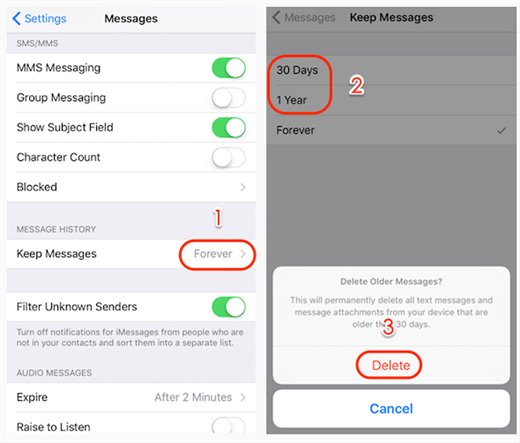
It’s important to check your iMessage settings to ensure that messages are not set to automatically delete after a certain period. Sometimes, users unknowingly enable settings that cause messages to disappear after a set amount of time, leading to confusion and frustration.
To adjust your message settings, open the Messages app on your iPhone, go to Settings, and review the options related to message retention and deletion to make sure that your messages are not being automatically erased.
5. Contact Syncing Issues
If you are experiencing disappearing iMessages when messaging specific contacts, it could be due to contact syncing issues. In some cases, when your iPhone has trouble syncing contacts with the Messages app, messages may not display properly or disappear altogether.
To address contact syncing issues, try updating your contacts list, ensuring that the contact you are messaging has the correct information saved on your device.
6. Temporary Glitches
Occasionally, iMessages may disappear due to temporary glitches or hiccups in the Messages app or iOS system. These issues are usually resolved on their own and do not indicate a more serious problem with your device.
If you notice iMessages disappearing sporadically, try restarting your iPhone or closing and reopening the Messages app to see if the issue persists. In most cases, temporary glitches will resolve themselves without the need for further action.
7. Contact Apple Support
If you have tried all the troubleshooting steps mentioned above and are still experiencing disappearing iMessages on your iPhone, it may be time to contact Apple Support for further assistance. Apple’s customer support team can help you diagnose and resolve more complex issues that may be causing messages to disappear on your device.
Remember, don’t panic if your iMessages are disappearing – there are often simple explanations and solutions for this common issue. By following the tips outlined in this article and staying proactive about managing your device’s settings and storage, you can minimize the chances of experiencing disappearing messages in the future.
Have you ever had iMessages disappear on you? What steps did you take to resolve the issue? Share your experiences in the comments below!
Text Messages Missing on iPhone? – Fixed Disappeared SMS From Inbox!
Frequently Asked Questions
Why are my iMessages disappearing?
iMessages may disappear due to various reasons, such as storage issues, software glitches, or settings on your device. Ensure that your device has enough storage space to store messages and that your software is up to date to prevent any glitches that may cause messages to vanish.
How can I prevent my iMessages from disappearing?
To prevent iMessages from disappearing, regularly back up your messages, avoid overloading your device with too many media files, and review your message settings to ensure they are not set to automatically delete messages after a certain period.
Can network connectivity affect the disappearing of iMessages?
Yes, network connectivity issues can sometimes lead to iMessages not being delivered or appearing to disappear. Make sure you have a stable internet connection when sending and receiving messages to prevent any disappearance due to network interruptions.
Final Thoughts
If you’ve been wondering “why are my iMessages disappearing,” several factors could be at play. From outdated software to incorrect settings or device storage issues, these can lead to missing messages. Checking for updates, adjusting settings, and managing storage can help prevent further disappearing iMessages. Stay proactive to ensure your messages are not lost. Remember, taking action promptly can save you from potential communication mishaps.

More Stories
Sports Betting Welcome Offers with Competitive Value and Clear Terms
Are The Expressions 0.5(3X + 5) And 1.5X + 2.5 Equivalent?
Why Should You Eat Before A Tattoo: Essential Tips